The Georgia Negro (Plate 1)
Challenge #4
View the challenges on GitHub23 Apr 2024
View the original
The Georgia Negro.
A Social Study By W.E. Burghardt Du BoisThis case is devoted to a series of charts, maps and other devi–ces designed to illustrate the development of the American Negro in a single typical state of the United States.
"The problem of the 20th century is the problem of the color-line."
How it's made
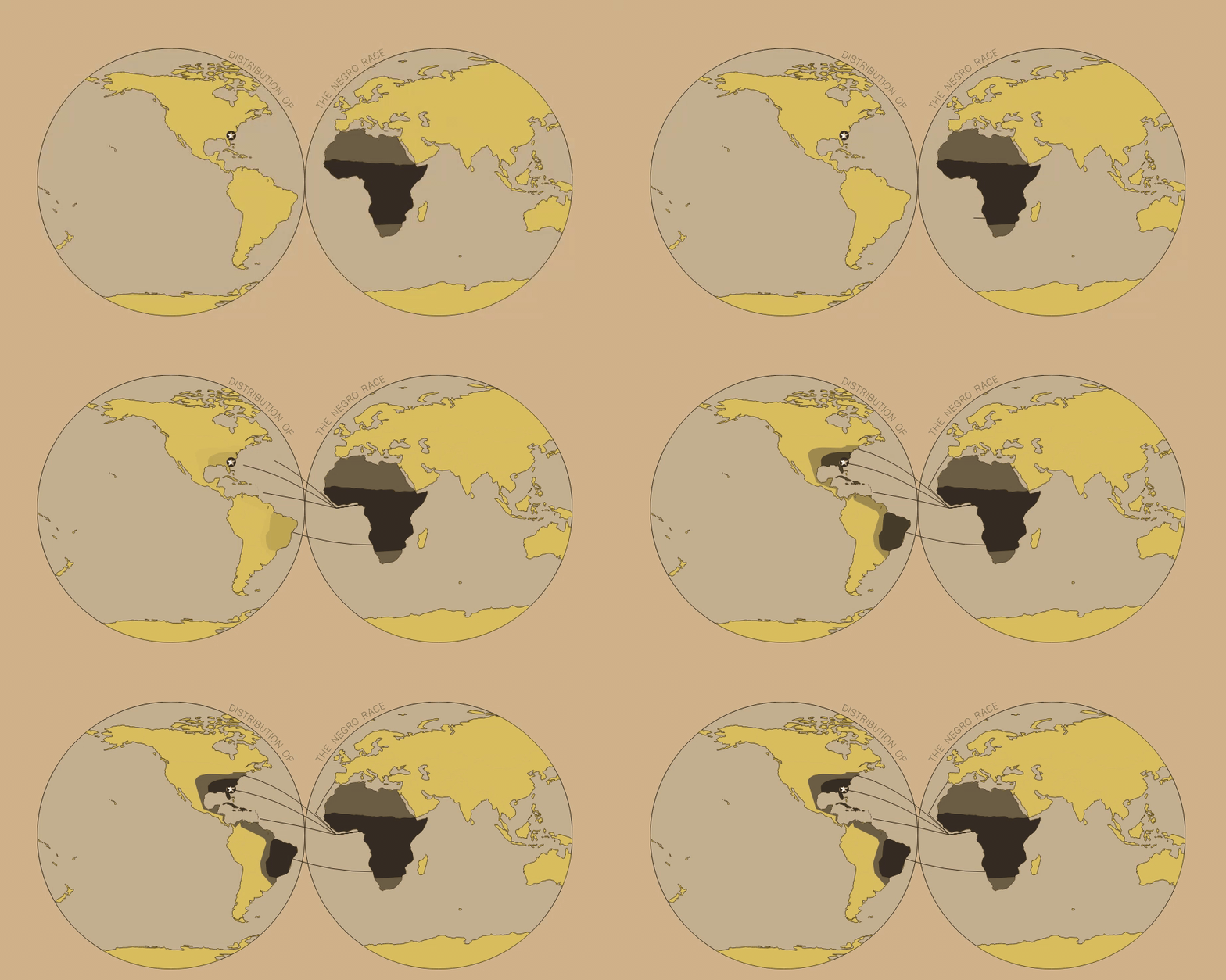
This plate maps the transatlantic slave trade routes and the subsequent black population in the Americas.
I started out using code from Connor Rothschild’s lesson Create an Interactive Globe Visualization With Svelte + D3.js.
This included using an SVG circle as the background of the globe and using the d3-geo and TopoJSON libraries to render countries’ borders and shapes.
To create the twin-globe look, I created two SVG circles for the background with centres placed at 25% and 75% of the chart’s width.
Next I needed to plot the countries’ borders.
I tried a few different projections, but didn’t come across one which looked right. geoEquirectangular() looked very close, but I still needed to figure out how to restrict the elements to those within the two globes.
I used SVG’s clipPath with circles identical in size to the background circles to exclude any map elements that fell outside them.
Draw the paths
As mentioned above, I generated the JSON for the routes with an online tool called geojson.io. The routes look something like this:
{
      "Source": ""Western Africa"",
      "Destination": ""Brazil"",
      "coords": [
        [
          14.7587,
          -22.1929
        ],
        [
            -38.4388, -12.9200
        ]
      ]
    }
Using Svelte, I created an SVG <path> element for each route, and used the draw transition to animate the routes from their source to their destination.
I still need to learn to curve the paths into arcs when using coordinates.
Draw the regions
Next I needed to draw the different regions on the plot - the dark areas for the locations African slaves were primarily transported from and to, and the lighter areas to indicate the wide reach of both the capturing and migration that occurred.
I ran into an interesting problem when drawing the regions - the points of polygon geometries need to be arranged in anti-clockwise order.
Unfortunately I had not adhered to this rule when creating the polygons and I didn’t really want to go back and re-do all that work.
Thankfully, there is a library that will rearrange the points to be in the order you need: turf.js (also see this StackOverflow post).
With this problem solved, I drew the regions and used Svelte’s fade transition on the destination shapes.
This transition, in combination with the animated routes, are meant to emphasize Du Bois’ static representation of the migration of slaves beyond their initial landing point.
How I want to make it better
First, I need to fix the transition speeds because, while they work locally, I have found that they can be much jerkier when published. After figuring out the right speeds, I would like to add an animation reset button because readers might miss the on-load animation the first time around. Here’s an example of what the transition looks like on my local machine.
I would also like to incorporate more granular data of individual slave trade routes. While I started to do this, I quickly realized it would be a much more involved analysis that would require decomposing Du Bois’ visual and I want to focus on learning to make visuals for now.
← Back to all plates